
You can prevent and manage back pain from sitting all day by changing small habits and using the right support. Shift your position often, set up your workspace to support your spine, and add simple daily stretches and strengthening moves to reduce pain and keep your back healthy.
This post shows why sitting strains your back, how to set up an ergonomic workspace, posture tips that actually work, quick active habits to break long sitting periods, simple daily exercises, useful tools, and when to get professional help. You will get clear, practical steps you can start using today to feel better at work and at home.
Understanding the Impact of Prolonged Sitting
Sitting for long periods changes how your body holds itself, weakens key muscles, and raises the chance of longer-term health problems. Small changes in posture, strength, and movement can make a big difference in how your back feels day to day.

Effects on Spinal Alignment
When you sit, your pelvis tends to tilt backward and your lower spine flattens. This reduces the natural curve (lumbar lordosis) that helps absorb shock. Over hours, discs in the lower back get extra pressure, which can lead to pain or early wear.
Leaning forward to see a screen increases strain on the neck and upper back. Every inch your head moves forward adds load to your cervical spine. You may feel stiffness, headaches, and soreness between the shoulder blades.
Poor chair height or a non-supportive backrest makes these alignment issues worse. You should aim to keep hips slightly higher than knees and maintain a small inward curve at the lower back to reduce harmful stresses.
Muscular Imbalance and Weakness
Long sitting shortens hip flexors and weakens gluteal muscles. Tight hip flexors pull on the pelvis, increasing lower back strain. Weak glutes fail to support your pelvis during standing or walking, pushing more work onto your lower back muscles.
Your abdominal muscles can become less active from prolonged sitting. That lowers trunk stability and increases load on the spine during movement. Tight chest and weak upper back muscles also promote a rounded shoulder posture.
You can reverse many changes with targeted movement: glute bridges, hip flexor stretches, and core activation exercises. Regular breaks with standing or walking restore normal muscle length and improve support for your spine.
Risk of Chronic Conditions
Sitting a lot increases risk factors tied to chronic back problems. Repeated disc compression and poor alignment can lead to degenerative disc changes over the years. These changes raise the chance of persistent low back pain and reduced mobility.
Sedentary behavior links to higher body weight and reduced insulin sensitivity. Extra body weight increases the mechanical load on the spine. Metabolic changes can also slow tissue healing and recovery after injury.
Extended sitting also correlates with higher rates of neck pain, sciatica symptoms, and shoulder dysfunction. Addressing posture, strength, and daily activity helps lower these risks and improve long-term spinal health.
Back Pain Old Age? 7 Daily Habits That Bring More Comfort
Age-related back pain is often caused by muscle weakness, joint stiffness, or disc wear, but small adjustments can make a big difference. Implementing these seven specific daily habits can relieve spinal pressure, increase flexibility, and bring significant comfort.
- Sleep with a pillow under the knees: Back sleeping puts pressure on your spine. Relieve this by placing a pillow beneath your knees to keep your lower back flat and supported all night.
- Stretch every morning: Gentle stretches like the Healthline Lower Back Stretches or Cat-Cow stretch help reverse overnight stiffness and lubricate the spine’s joints.
- Check your sitting posture: Avoid slouching over a desk or phone. Sit with your shoulders back, feet flat on the floor, and use a lumbar pillow to support your spine’s natural curve.
- Take movement breaks: Sitting for too long weakens muscles and stiffens the back. Stand up, reset your posture, or take a short walk every 30 to 60 minutes.
- Strengthen your core: Strong abdominal and back muscles support the spine, preventing back strain during everyday tasks. Simple exercises like bridges or planks can make a massive difference.
- Lift with your knees: Always bend at your knees and hips, not your waist. Keep objects close to your body and never twist your torso while carrying heavy items.
- Stay hydrated: Water keeps the spinal discs hydrated and maintains their shock-absorbing elasticity. Aim to drink at least eight glasses daily to support disc health.
10 Easy Fixes for Back Pain Office Worker Struggles
- Adjust Your Seat Height: Set your chair so that your feet rest perfectly flat on the floor, with your hips and knees at roughly a 90-degree angle. If your feet dangle, your pelvis rolls backward, and strains your lower back; use a footstool if needed.
- Use Proper Lumbar Support: Sit with your glutes all the way at the back of the chair to utilize the built-in lower back curve. If your chair lacks this, use a small lumbar pillow or a rolled-up towel to support your lower spine.
- Position Your Monitor Properly: Place your computer screen directly at eye level, roughly an arm’s length away. If you are looking down, especially on a laptop, use a laptop stand or stacked books to prevent “tech neck” and upper back strain.
- Align Your Keyboard & Mouse: Keep your keyboard close to the edge of your desk so your elbows remain relaxed at a 90-degree angle near your sides. Reaching far forward creates unnecessary tension in your shoulder blades and upper traps.
- Implement “Micro-Breaks”: Set a timer to stand up and walk around for 2 to 3 minutes every 30 to 45 minutes. This simple habit reverses static spinal loading and rehydrates your spinal discs.
- Try Scapular Squeezes: Reset rounded shoulders by sitting upright and pinching your shoulder blades together as if holding a pencil between them. Hold for 3 seconds and repeat 10 times.
- Perform Seated Cat-Cow Stretches: Loosen a stiff spine by placing your hands on your knees, inhaling while arching your back and looking up, then exhaling while rounding your back and tucking your chin.
- Undo “Sitting Syndrome” with Hip Flexor Stretches: Stand up, step one foot back, and gently push your hips forward until you feel a stretch in the front of your rear hip. This relieves the tension that tight hips place on your lower back.
- Incorporate Seated Spinal Twists: While seated, twist your torso to the right (using your chair arm for gentle leverage), hold for 15 seconds, and switch sides. This releases deep tension along your mid and lower back.
- Switch to an Adjustable Standing Desk: Alternate between sitting and standing throughout the day. This shifts the load from your spinal discs to your leg muscles and encourages natural shifts in your posture.
Ergonomic Workspace Design
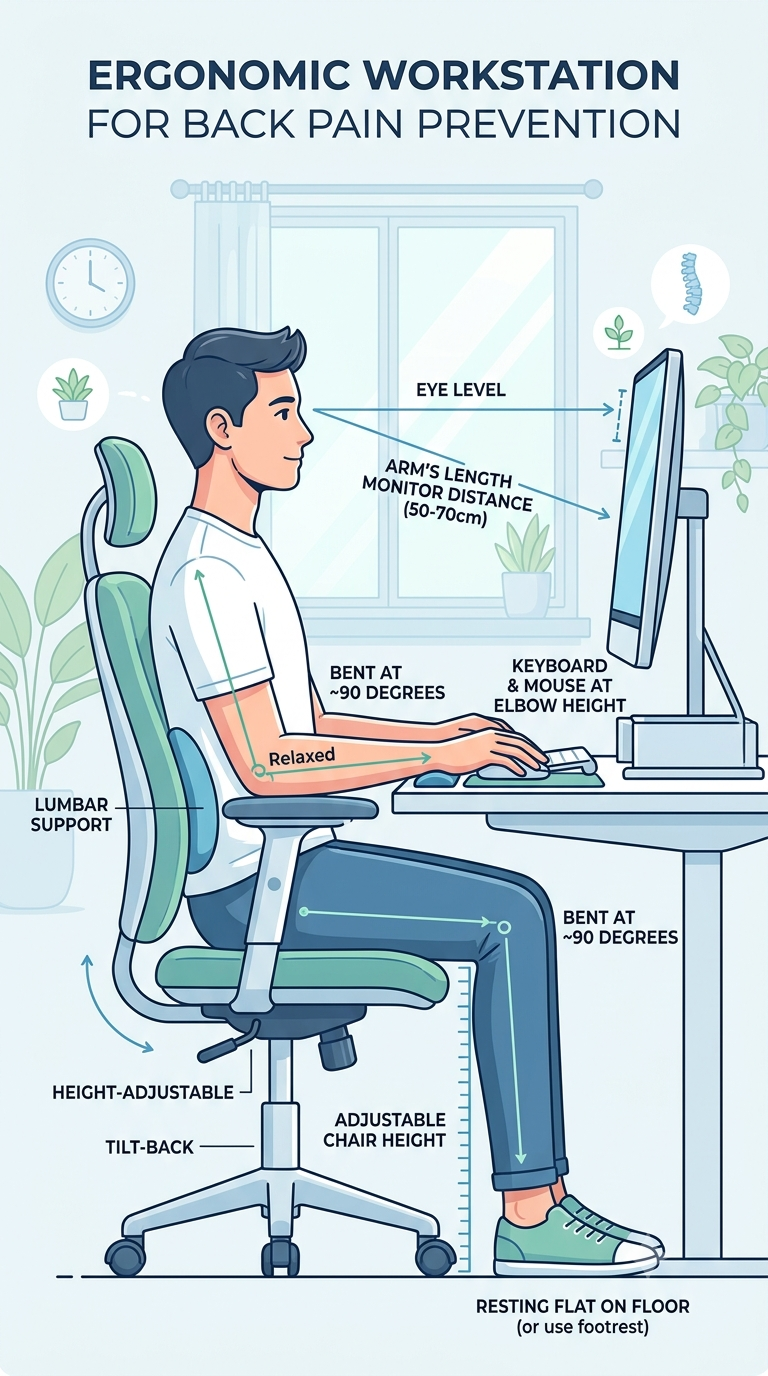
Small changes to your chair, desk, and foot support can cut strain on your lower back. Set your workspace so your spine stays neutral, your shoulders relax, and your feet rest flat.
Selecting the Appropriate Chair
Choose a chair with adjustable seat height, lumbar support, and a backrest that tilts. Set seat height so your knees form a 90°–100° angle and your feet sit flat on the floor or a footrest. The lumbar support should fit the curve of your lower spine; adjust it until you feel a gentle inward support at your lower back.
Seat depth matters: you should have 2–3 inches of space between the back of your knees and the seat edge. Use armrests to relax your shoulders; set them so your elbows rest lightly at about 90°. Sit back so your backrest supports your whole lower and mid back.
Desk and Monitor Positioning
Place your monitor an arm’s length away (about 20–30 inches) and set the top of the screen at or slightly below eye level. This keeps your neck neutral and prevents you from leaning forward. If you use two monitors, align the primary one directly in front and the secondary to the side, keeping both within easy reach.
Adjust keyboard and mouse so your elbows stay close to your body and form about a 90° angle. Keep your wrists straight and hover your hands over the keyboard; rest only when pausing. If you use a laptop, use a separate keyboard and a riser so the screen and input devices are at proper heights.
Importance of Foot Support
Resting your feet flat reduces pressure on your lower spine and helps maintain a neutral pelvis. If your feet don’t reach the floor, use a footrest that keeps your ankles at about 90° and supports the whole foot. A stable footrest with a textured surface prevents slipping and encourages brief foot movement.
Avoid crossing your legs for long periods; that shifts your hips and can twist your lower back. If you wear shoes with high heels, change to flats while seated or use an angled footrest to keep your feet stable and your spine aligned.
Optimal Sitting Posture
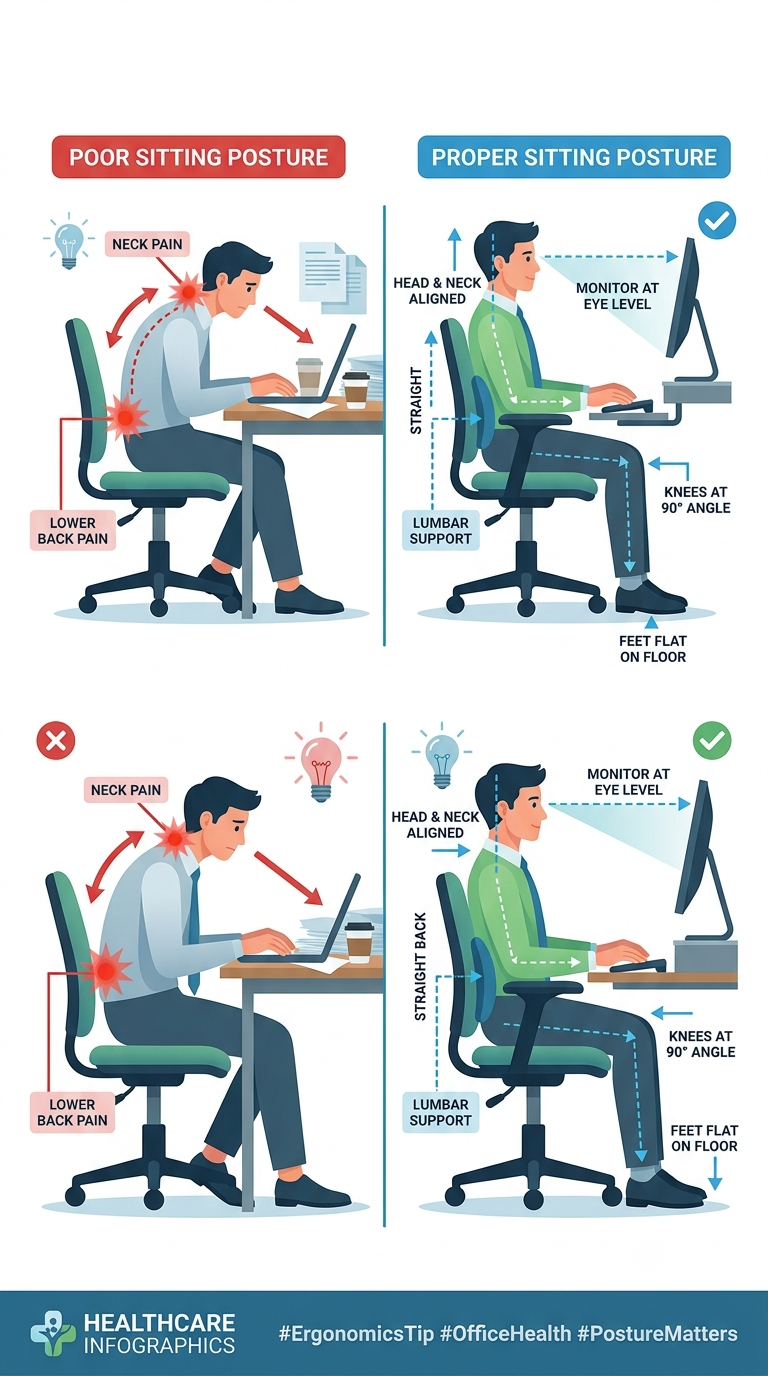
Keep your spine neutral, hips level, and shoulders relaxed. Small adjustments to pelvis, neck, and arms cut strain and help you stay comfortable while sitting.
Positioning the Pelvis and Lower Back
Sit all the way back in your chair so the seat pan supports your thighs and pelvis. Place a small lumbar roll or folded towel at the curve of your lower back to preserve the natural S-shape of your spine. Your hips should be slightly higher than your knees by about 1–2 inches; adjust seat height or add a cushion if needed.
Distribute weight evenly across both sit bones. Avoid slumping or tipping the pelvis backward. If you feel pressure under your thighs, move slightly forward to reduce compression behind your knees.
Check pelvis position often. Tilt your pelvis forward gently to lengthen the lower back when you feel rounded. Stand up and reset every 30–60 minutes to relieve pressure.
Shoulder and Neck Alignment
Keep your shoulders relaxed and down, not pulled up toward your ears. Roll your shoulders back slightly so your shoulder blades sit flat against your upper back. This reduces strain across the neck and upper traps.
Align your ears over your shoulders and your chin level, not jutting forward. Bring the top of your screen to eye level or slightly below to avoid looking up or down. Use a monitor riser, laptop stand, or external screen to reach the right height.
If you wear bifocals, lower the screen so you can look straight ahead without tilting your head. Take micro-breaks to stretch your neck—tilt and turn slowly for 10–15 seconds each direction.
Adjusting Arm and Wrist Placement
Position your forearms parallel to the floor or sloping slightly down toward your keyboard. Rest your elbows close to your sides at about a 90–110 degree angle. Use armrests to support your forearms without lifting your shoulders.
Keep wrists straight and in-line with your forearms while typing or using a mouse. Place a wrist pad or a slim keyboard tray so your hands do not bend up or down. Move the mouse close to the keyboard to avoid overreaching.
Adjust chair height and keyboard position together. If your feet no longer rest flat, add a footrest. Reposition input devices so you can keep relaxed shoulders and a neutral wrist position throughout the day.
Active Habits for Reducing Back Strain
Move often, change positions, and use simple exercises to ease pressure on your spine. Short, regular actions help keep muscles active and reduce stiffness.
Scheduled Movement Breaks
Set a timer for a standing or walking break every 25–45 minutes. Stand up, walk 2–5 minutes, and perform a quick shoulder roll and neck tilt while you walk. This resets posture and boosts blood flow.
Use a schedule you can keep. Block breaks in your calendar or use an app that nags you. If you work in meetings, stand during phone calls or stretch at the end of each call.
Aim for at least 20–30 minutes of light activity every workday in addition to breaks. This can be a brisk 10-minute walk twice a day. Track breaks with a simple checklist or phone reminder.
Micro-Exercises at the Desk
Do short exercises you can perform without leaving your chair. Examples: seated cat-cow (arch and round your back), seated hip marches, and standing calf raises. Do 8–15 reps per move.
Use a routine of 3–5 moves every hour. Combine mobility (neck circles, shoulder rolls) with core activations like seated pelvic tilts. These improve stability and reduce strain on lumbar discs.
Keep exercises clear and repeatable. Use a sticky note with 4 moves or an hourly alarm labeled with the exercise names. Progress by adding light resistance bands or a 2–3 minute standing plank when you can.
Integrating Standing Tasks
Identify tasks you can do standing: phone calls, reading, or quick email triage. Convert two or three tasks per day into standing tasks to cut sitting time.
Set up a stable standing area at your desk or a high counter. Keep monitor height at eye level and keyboard at elbow height to avoid shoulder and neck strain.
Alternate standing with sitting in 15–45 minute blocks. If you use a sit-stand desk, change position every 20–40 minutes. Use anti-fatigue mats and supportive shoes to reduce leg and lower back discomfort.
Daily Stretching and Strengthening Protocols
You should focus on short daily moves that build core strength, loosen the lower back, and open tight hips and hamstrings. Do these exercises in sets you can manage, and increase reps slowly.
Core Muscle Exercises
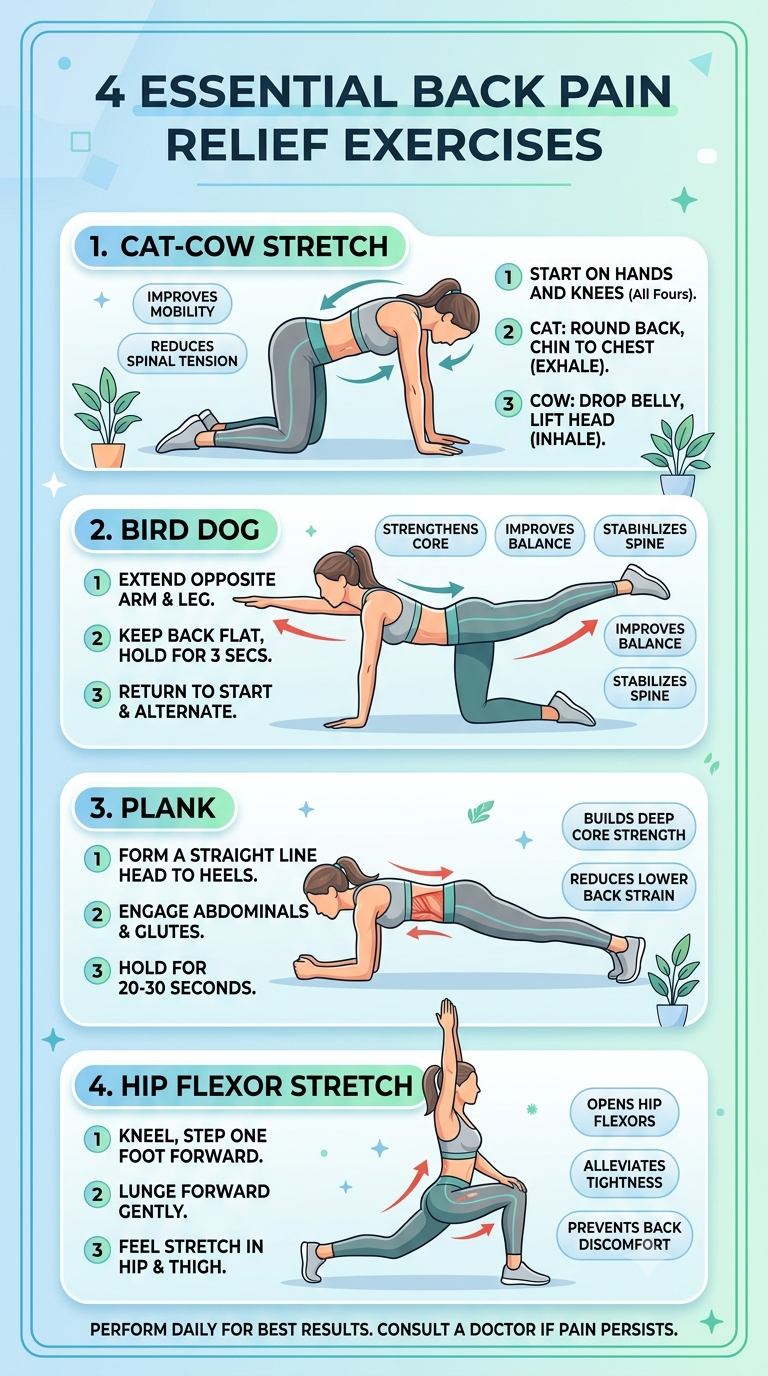
Strengthen transverse abdominis and obliques to support your spine. Try the dead bug: lie on your back, tuck your pelvis, lift opposite arm and leg slowly, then switch. Do 8–12 slow reps per side. Add the bird dog on hands and knees, reaching one arm and opposite leg; hold 2–3 seconds. Aim for 8–12 reps per side.
Include planks for 20–45 seconds if you can keep a straight line. Rest 30–60 seconds and repeat 2–4 times. Keep breathing and avoid sagging hips. Finish with side planks for 10–30 seconds per side to target obliques.
Lower Back Stretches
Reduce tension with gentle spinal mobility and extension work. Perform a cat–cow sequence for 8–12 slow cycles to improve flexion and extension. Move smoothly and breathe with each change.
Use the child’s pose for 30–60 seconds to lengthen the lumbar spine. If you feel stiffness, try lying knee-to-chest pulls one leg at a time for 20–30 seconds each. Avoid any stretch that causes sharp pain. Do these stretches 1–3 times daily, especially after long sitting periods.
Hip Flexor and Hamstring Routines
Open tight hips and lengthen hamstrings to relieve low back strain. Kneeling hip flexor stretch: kneel on one knee, rotate pelvis under, and press hips forward. Hold 30 seconds per side. Repeat 2–3 times.
For hamstrings, try seated or standing single-leg stretches: keep a straight back, hinge at hips, and reach toward your foot for 20–30 seconds per leg. Use a strap if you can’t reach. Add dynamic leg swings front-to-back for 10–15 reps to improve mobility before sitting.
Lifestyle Adjustments for Spinal Health
Small daily changes reduce strain on your spine and cut back pain. Focus on weight control, sleep that supports spinal alignment, and eating for bone and muscle strength.
Maintaining a Healthy Weight
Carrying extra weight raises pressure on your lumbar spine and disks. Aim for a body mass index (BMI) in the healthy range and lose weight gradually: 0.5–1 kg per week is safe for most adults. Combine calorie control with activity; try 150 minutes of moderate exercise weekly and two muscle-strengthening sessions.
Use concrete tools: track calories with an app, measure portions with a kitchen scale, and set weekly weight targets. Choose lean proteins, whole grains, vegetables, and limit sugary drinks and fried foods. If you have medical conditions, consult your healthcare provider before starting a diet or exercise plan.
Small posture-friendly habits help: avoid long periods of sitting, take a 3–5 minute standing or walking break every 30–45 minutes, and use a supportive chair. Even modest weight loss often reduces back pain and makes movement easier.
Promoting Quality Sleep
Poor sleep positions increase spinal pressure and muscle tension. Sleep on a medium-firm mattress that keeps your spine neutral. If you sleep on your back, place a pillow under your knees; if you sleep on your side, put a pillow between your knees.
Pick a pillow that supports neck alignment; your head should not tilt up or down. Keep a regular sleep schedule: go to bed and wake up at the same times daily to improve sleep quality. Limit screens and heavy meals 60–90 minutes before bed.
If pain wakes you, try gentle stretches or a hot pack before bed. If pain prevents sleep for more than a few weeks, see a clinician for evaluation and targeted treatment options.
Nutrition for Bone and Muscle Support
Calcium and vitamin D are key for bone strength. Aim for about 1,000–1,200 mg of calcium daily from dairy, fortified plant milks, canned salmon, or leafy greens. Get 800–1,000 IU of vitamin D daily from sunlight, fortified foods, or supplements if blood tests show low levels.
Protein helps build and repair muscle that supports the spine. Consume 1.0–1.2 grams of protein per kilogram of body weight daily, focusing on lean meats, beans, eggs, and dairy. Include anti-inflammatory foods like fatty fish, walnuts, berries, and olive oil to reduce muscle soreness.
Limit excess alcohol and avoid smoking; both harm bone health and slow healing. If you take supplements, follow recommended doses and talk to your doctor about interactions with medications.
Utilizing Supportive Tools and Aids
You can reduce sitting pain by adding simple tools and devices that improve posture and change how you sit. Choose aids that fit your body, your chair, and your daily routine.
Lumbar Cushions and Supports
A lumbar cushion fills the gap between your lower back and the chair. Pick a cushion with firm support and a slight curve to match your lumbar spine. Memory foam or high-density foam keeps shape; avoid thin or overly soft pads that flatten quickly.
Position the cushion so it sits at the small of your back, about 2–4 inches above your belt line. Attach straps if the cushion moves; a non-slip cover also helps. Use it for long stretches of sitting, then remove it for short breaks to let your back move freely.
Check cushion height and thickness: if you lean forward, it’s too high; if you feel no support, it’s too thin. Replace cushions every 1–2 years or when they lose shape. Clean covers regularly to prevent sweat and dust buildup.
Sit-Stand Desks
A sit-stand desk lets you switch between sitting and standing to vary load on your spine. Set standing height so your elbows rest at 90 degrees and your monitor top aligns with your eye level. When sitting, your knees should be at hip height or slightly lower.
Start by standing 15–30 minutes every hour and build up to a 50/50 split across the day. Wear flat, supportive shoes while standing and use an anti-fatigue mat to reduce foot and leg strain. Move your feet and shift weight often to avoid static posture.
Choose a desk that lifts smoothly and holds stable at any height. If space or budget limits you, use a converter platform on your existing desk. Keep frequently used items within arm’s reach to avoid twisting while standing.
Wearable Posture Devices
Wearable posture devices give gentle feedback when you slouch. Many use vibration, a light, or an app alert to remind you to sit upright. Pick a device that fits comfortably under clothing and allows you to set sensitivity and reminder intervals.
Use the device as a training tool, not a crutch. Aim to build stronger back and core habits by following a device’s reminders with 30–60 seconds of posture correction and a brief stretch. Combine wearables with strengthening exercises for lasting improvement.
Monitor skin comfort and battery life. If you feel irritation, adjust placement or add a thin shirt layer between skin and device. Stop using any device that causes pain or numbness and consult a clinician if posture problems persist.
Identifying Warning Signs and Seeking Professional Guidance
Pay attention to ongoing pain, loss of function, and any new numbness or weakness. Act promptly if your symptoms get worse, limit work, or stop normal activities.
Recognizing Persistent Symptoms
If your pain lasts more than 4–6 weeks despite home care, note patterns and triggers. Record when pain is worse—after sitting, when standing up, or during bending. Check for signs like:
- Constant aching that does not ease with rest
- Pain that wakes you at night
- Numbness, tingling, or burning down one or both legs
Watch for changes in movement. If you limp, cannot hold objects, or can’t sit or stand for normal durations, these are red flags. Also note any fever, unexplained weight loss, or recent severe injury with back pain; those require urgent evaluation.
When to Consult a Specialist
See your primary care doctor if pain affects daily work, sleep, or mood for several weeks. Bring a short history: when pain started, what makes it better or worse, medications tried, and any past spine injuries.
Your doctor may refer you to:
- A spine specialist for persistent or severe pain
- A neurologist for worsening numbness or weakness
- An orthopedic surgeon if imaging shows structural problems
Expect targeted exams and possibly imaging (X-ray, MRI) when symptoms suggest nerve compression, fracture, or infection. Ask about red-flag signs that need immediate care, like bowel or bladder changes or severe progressive weakness.
Role of Physical Therapy
A physical therapist will assess your posture, movement, and strength. They design a specific plan with exercises for core stability, hip mobility, and spinal alignment.
Therapy often includes:
- Hands-on techniques to reduce pain
- Supervised exercises to improve endurance and flexibility
- Training in proper sitting, standing, and workstation setup
You will learn home exercises and strategies to prevent flare-ups. Follow the plan consistently for best results; therapists adjust the program as you improve or if problems persist.